What you'll learn
Before any Lambda or container runs, something has to create the base infrastructure it sits on — the network, storage, the event bus, the identities. This part maps that base layer and answers the question every team gets wrong at first: which pieces do you build with Terraform, and which with CloudFormation / SAM?
Two layers, two owners. A shared platform (VPC, buckets, event bus, database, IAM) that changes rarely and is owned by no single service — and the services (Lambdas, APIs, containers) that plug into it and deploy many times a day.
This is the real CargoNaut / JunctionNet split: a *-platform repo in Terraform owns the shared infra; each service repo's SAM template references it. The examples below are that pattern, distilled.
Two layers: the platform vs the services
Everything downstream (Parts 5–7) plugs into a base that already exists. Keep the two layers — and their tools — cleanly separated:
┌─ PLATFORM  (Terraform — shared, stateful, long-lived) ─────────────┐
│  VPC · subnets · security groups · S3 · RDS · EventBridge bus       │
│  ECR · IAM baseline + OIDC · Route53 / ACM · /platform/* SSM params  │
└───────────────────────────────┬────────────────────────────────────┘
                                 │  reads ids/ARNs via {{resolve:ssm:/platform/*}}
┌───────────────────────────────▼────────────────────────────────────┐
│  SERVICES  (SAM / CloudFormation — per-service, deployed often)      │
│  Lambda · API Gateway · EventBridge RULES · scoped IAM · task defs   │
└─────────────────────────────────────────────────────────────────────┘The platform is the noun; services are the verbs. The platform is state that must survive — deleting it loses data. Services are compute you redeploy freely. Never mix the two in one stack.
The base infrastructure
VPC & subnets
The private network; public subnets for load balancers, private for compute + data.
Security groups
Virtual firewalls — who can talk to the database, the cache, the internet.
S3 & RDS
Stateful storage: object buckets and the relational database. Must outlive any deploy.
EventBridge bus
The cross-service event backbone (Part 8) — one per stage, shared.
ECR
Private image registry for the container path (Part 7), with lifecycle policies.
IAM & OIDC
Baseline roles and the GitHub OIDC provider that keyless CI deploys assume.
Route 53 & ACM
DNS zones and TLS certificates — account/domain-level, shared by everything.
Terraform vs CloudFormation / SAM — who owns what
The dividing line is simple once you see it: state and sharing. If a resource holds data or is used by more than one service, it belongs to the platform (Terraform). If it's compute that one service owns and redeploys, it belongs to that service's stack (SAM / CloudFormation).
| Resource | Create with | Why |
|---|---|---|
| VPC, subnets, NAT, route tables | Terraform | Shared by everything, changes rarely, owned by no single service. |
| Security groups (shared) | Terraform | Shared network policy; services reference them by id. |
| S3 buckets, RDS / Aurora | Terraform | Stateful — must survive any stack delete. Never in an app stack. |
| EventBridge bus | Terraform | Cross-service backbone; one per stage. |
| ECR repos, IAM baseline, OIDC provider | Terraform | Account-level, shared, security-sensitive. |
| Route 53 zones, ACM certs | Terraform | Domain / account-level, shared. |
/platform/* SSM params | Terraform | The contract every service reads. |
| Lambda functions | SAM / CFN | Per-service compute, deployed often, owned by the service. |
| API Gateway / routes | SAM / CFN | Per-service HTTP surface. |
| EventBridge rules, scoped IAM | SAM / CFN | Each service owns its subscriptions and least-privilege role. |
| ECS task defs / services | CFN / CDK or TF | Per-service; either — often IaC alongside the service. |
The rule of thumb: stateful + shared + long-lived → Terraform; stateless + per-service + deployed-often → SAM / CloudFormation. Terraform owns the platform; SAM owns the services that plug into it. A per-service stack must never create a shared or stateful resource — deleting the stack would delete the data.
Step 0: the chicken-and-egg before Terraform can run
Everything above assumes Terraform already works. On a brand-new AWS account it
doesn't, and the reason is circular: Terraform keeps its state in an S3 bucket and
takes a lock in a DynamoDB table, and it assumes an IAM role to do any of it.
Terraform cannot create its own backend — the backend has to exist
before the first init.
terraform init ──needs──► S3 state bucket ──┐
               ──needs──► DynamoDB lock table ├── which Terraform would have to create…
               ──needs──► an IAM role to assume ┘   …but it can't run without them.

                    ▼
        ONE CloudFormation stack, run once per account+region, by a human.
CloudFormation is the right tool here precisely because it has no backend of its own:
state lives in the AWS control plane. So the bootstrap is a single template
(aws-account-bootstrap/cfn-bootstrap.yaml) and a wrapper
script, run once with admin credentials, and then essentially never again.
$ ./bootstrap.sh --account-name dev --region us-west-1 \
      --trusted-arns "arn:aws:iam::123456789012:user/you,arn:aws:iam::123456789012:role/github-actions"

# Include YOURSELF. Pass only the CI role and the bootstrap succeeds — and then
# you cannot assume the role you just created.This is the cleanest example of the two-tool split in this whole part. Terraform owns the shared, long-lived platform; SAM owns per-service compute; and plain CloudFormation owns the one thing that must exist before Terraform can hold state at all. Three tools, three non-overlapping jobs.
Inside the bootstrap stack
Three resources, and every setting on them is defensive:
StateBucket:
  Type: AWS::S3::Bucket
  DeletionPolicy: Retain          # deleting the stack must NEVER delete state
  UpdateReplacePolicy: Retain
  Properties:
    BucketName: !Sub "${ProjectName}-terraform-state-${AWS::Region}"
    VersioningConfiguration: { Status: Enabled }   # state history = your undo
    BucketEncryption:
      ServerSideEncryptionConfiguration:
        - ServerSideEncryptionByDefault: { SSEAlgorithm: aws:kms }
          BucketKeyEnabled: true                # cuts KMS request cost ~99%
    PublicAccessBlockConfiguration:              # all four, always
      { BlockPublicAcls: true, BlockPublicPolicy: true,
        IgnorePublicAcls: true, RestrictPublicBuckets: true }
    LifecycleConfiguration:
      Rules:
        - { Id: CleanupOldVersions, Status: Enabled,
            NoncurrentVersionExpiration: { NoncurrentDays: 90 } }

LockTable:
  Type: AWS::DynamoDB::Table
  DeletionPolicy: Retain
  Properties:
    TableName: !Sub "${ProjectName}-terraform-lock-table"
    BillingMode: PAY_PER_REQUEST              # idle cost: nothing
    KeySchema: [ { AttributeName: LockID, KeyType: HASH } ]
PointInTimeRecoverySpecification: { PointInTimeRecoveryEnabled: true }| Setting | Why it's there |
|---|---|
DeletionPolicy: Retain | The single most important line in the file. A delete-stack that takes your Terraform state with it turns a tidy-up into a rebuild of every environment — and the state file is the only record of what Terraform thinks it owns. |
| Bucket versioning | A corrupted or truncated state file is recoverable by restoring the previous version. This has saved more platforms than any backup policy. |
BucketKeyEnabled: true | With SSE-KMS, every object read is a KMS API call. A bucket key collapses those into one — Terraform reads state constantly, and this is the difference between cents and a surprising KMS bill. |
| 90-day noncurrent expiry | Versioning without a lifecycle rule grows forever. Ninety days is far longer than any recovery you'll actually do. |
PAY_PER_REQUEST + PITR | The lock table holds one tiny row while an apply is running. Provisioned capacity would bill around the clock for a table that is idle 99.9% of the time. |
The bucket also carries a policy that refuses plaintext access outright — cheap, and
it closes the "someone's script used http://" hole:
- Sid: DenyInsecureTransport
  Effect: Deny
  Principal: "*"
  Action: "s3:*"
  Resource: [ !GetAtt StateBucket.Arn, !Sub "${StateBucket.Arn}/*" ]
  Condition: { Bool: { "aws:SecureTransport": "false" } }
The Terraform role: scoped, not AdministratorAccess
The tempting shortcut is one role with AdministratorAccess,
because Terraform "needs to create everything". It doesn't — it needs to create the
specific things your modules declare. The bootstrap stack attaches
ten separate managed policies, one per module the platform actually has:
cargonaut-terraform-role
  ├─ cargonaut-terraform-state               S3 state bucket + DynamoDB lock only
  ├─ cargonaut-terraform-vpc                 VPC, subnets, route tables, NAT, IGW
  ├─ cargonaut-terraform-sg                  security groups + rules
  ├─ cargonaut-terraform-apigw-vpclink       VPC links (+ the service-linked role)
  ├─ cargonaut-terraform-route53             hosted zones + records
  ├─ cargonaut-terraform-acm                 certificates
  ├─ cargonaut-terraform-appconfig           AppConfig apps, envs, profiles
  ├─ cargonaut-terraform-platform-resources  shared S3 buckets, SSM params, account alias
  ├─ cargonaut-terraform-logs                CloudWatch log groups
  └─ cargonaut-terraform-tagging             tag read/write across the above
Two things make that list maintainable rather than a permissions treadmill:
- One policy per module. When you add a module you add a policy, and the diff says exactly which new powers the platform just gained. A reviewer can see that in a pull request; they cannot see it in
AdministratorAccess. - Every statement is region-locked. Actions like
ec2:CreateSecurityGroupcan't be scoped by ARN, so they're granted on"*"— and then fenced with a condition, which turns "anywhere in the account" into "this region":
Condition:
  StringEquals:
    "aws:RequestedRegion": !Ref "AWS::Region"
And the trust policy names who may assume it — your deployer, and CI:
TerraformRole:
  Type: AWS::IAM::Role
  Properties:
    RoleName: !Sub "${ProjectName}-terraform-role"
    MaxSessionDuration: 7200                # 2h — a long run-all shouldn't expire mid-apply
    AssumeRolePolicyDocument:
      Statement:
        - Effect: Allow
          Principal: { AWS: !Ref TrustedPrincipalArns }
Action: "sts:AssumeRole"An external ID only exists if the trust policy checks for it. Our bootstrap script helpfully prints an external_id = cargonaut-terraform line for your ~/.aws/config — but the trust policy above has no sts:ExternalId condition, so nothing enforces it. STS accepts the assume either way, and the profile looks protected while the role is guarded only by the principal list. If you want an external ID, it has to appear in Condition: StringEquals: { "sts:ExternalId": … }; if you don't, don't print one. A control that only exists in the client config is a comment.
For CI, pass the OIDC role — not a user. --trusted-arns takes a comma-separated list, so the natural production setup is your break-glass admin plus arn:aws:iam::…:role/github-actions from the keyless OIDC setup below. That's the whole chain: GitHub proves who it is to AWS, assumes a role trusted by this one, and Terraform runs with ten scoped policies. No stored key at any hop.
What the script does beyond deploy
A one-time script that runs against production with admin credentials should be boring and loud. This one is:
- Prints who you are before it does anything.
sts get-caller-identity→ account, ARN, region, echoed to the terminal. Running the dev bootstrap against production is the mistake this prevents, and it costs one API call. - Lists what it will create, then asks. An interactive
Proceed? (y/N)defaulting to no. Correct for a once-per-account operation; wrong for anything in a pipeline. - Deploys with
--no-fail-on-empty-changeset, so re-running it is a safe no-op rather than an error — which is what makes it re-runnable when you add a policy. - Writes the account id back into
terragrunt.hcl. The repo ships with aREPLACE_WITH_DEV_ACCOUNT_IDplaceholder; the script substitutes the real id from the caller identity. No copy-paste, no wrong-account typo. - Prints the next three commands — the profile block to add, the
export AWS_PROFILE, and theterragrunt run-all apply. The handover is in the tool, not in a wiki page that goes stale.
teardown.sh deletes the stack, not the state. Because the bucket and table are Retain, tearing down leaves both behind — deliberately. Emptying a versioned bucket and deleting the table is a manual, two-step, hard-to-do-by-accident job, which is exactly the right amount of friction for destroying the record of everything Terraform manages.
Wiring Terragrunt to what the bootstrap created
The stack has created a bucket, a table and a role. Nothing yet tells Terraform to
use them — and nothing ever checks that the names agree. Three names have to
match by hand, and a typo in any of them fails at
init with an error about the wrong thing:
| The bootstrap stack creates | terragrunt.hcl must say |
|---|---|
cargonaut-terraform-state-us-west-1 | remote_state_bucket_region["us-west-1"] |
cargonaut-terraform-lock-table | dynamodb_table |
cargonaut-terraform-role | account_role_name, used to build iam_role |
The root infrastructure/live/terragrunt.hcl is where all three land:
locals {
  # bootstrap.sh writes the real id over this placeholder for you
  account_mapping = {
    dev        = "123456789012"
    production = "REPLACE_WITH_PRODUCTION_ACCOUNT_ID"
  }
  remote_state_bucket_region = { us-west-1 = "cargonaut-terraform-state-us-west-1" }
  account_role_name          = "cargonaut-terraform-role"
}

# THE handover: every module runs as the bootstrap role, never as you.
iam_role = "arn:aws:iam::${local.account_mapping[local.aws_env]}:role/${local.account_role_name}"

remote_state {
  backend  = "s3"
  generate = { path = "backend.tf", if_exists = "overwrite_terragrunt" }
  config = {
    bucket         = local.remote_state_bucket_region[local.region]
    # one state file per component — never one big shared state
    key            = "${local.application}/${local.service}/${local.aws_env}/${local.component}/terraform.tfstate"
    region         = local.region
    encrypt        = true
    dynamodb_table = "cargonaut-terraform-lock-table"
  }
}
And one guardrail in the generated provider, which is the cheapest protection against the worst possible Tuesday:
provider "aws" {
  region              = "us-west-1"
  allowed_account_ids = ["123456789012"]   # refuses to run against any other account
}Terragrunt's iam_role does the assume for you. You authenticate as yourself; Terragrunt calls sts:AssumeRole and runs every provider call as the scoped role. That's why your own ARN must be in --trusted-arns — and why nothing in the repo ever needs admin credentials after the one bootstrap run.
Setting up Terragrunt: three levels
Terragrunt
exists to kill three kinds of repetition in plain Terraform: the
backend block, the provider
block, and the ordering between many small state files. You need
Terraform ≥ 1.5 and Terragrunt ≥ 0.50, and then the
whole trick is the directory layout:
infrastructure/
├── modules/                     ← plain Terraform. No env, no backend, no provider.
│   ├── vpc/                        main.tf · variables.tf · outputs.tf
│   └── security-groups/
└── live/
    ├── terragrunt.hcl           ← ONE root: backend, provider, iam_role, accounts
    ├── _env/                    ← ONE per resource type: which module + shared inputs
    │   ├── vpc.hcl
    │   └── security-groups.hcl
    └── dev/us-west-1/           ← the leaves. Four lines each.
        ├── vpc/terragrunt.hcl
        └── security-groups/terragrunt.hcl
A leaf really is four lines — it names its two parents and nothing else:
# live/dev/us-west-1/vpc/terragrunt.hcl
include "root" { path = find_in_parent_folders() }

include "env" {
  path   = "${get_terragrunt_dir()}/../../../_env/vpc.hcl"
  expose = true
}
The _env file is where a resource type is defined once for
every environment — which module to run, and the inputs that vary only by env:
# live/_env/vpc.hcl
locals {
  env_vars      = read_terragrunt_config(find_in_parent_folders("terragrunt.hcl"))
  aws_env       = local.env_vars.locals.aws_env
  platform_vpcs = local.env_vars.locals.platform_vpcs
}

terraform {
  source = "${get_repo_root()}/infrastructure/modules//vpc"
}

inputs = {
  vpc_cidr           = local.platform_vpcs[local.aws_env].cidr
  azs                = local.platform_vpcs[local.aws_env].azs
  private_subnets    = local.platform_vpcs[local.aws_env].private_subnets
  enable_nat_gateway = true
  environment        = local.aws_env
}The double slash in modules//vpc is not a typo. Everything before it is the "repo" Terraform copies; everything after is the subdirectory to run. Write a single slash and Terragrunt copies the entire repository into .terragrunt-cache for every module — slow, and it breaks relative paths in confusing ways.
The path is the configuration
Here is why the leaves can be four lines. The root config doesn't take environment or region as inputs — it reads them out of the directory path:
# live/terragrunt.hcl
env_region_regex = "infrastructure/live/([a-zA-Z0-9-]+)/([a-zA-Z0-9-]+)/([a-zA-Z0-9-]+)"
matches   = regex(local.env_region_regex, get_original_terragrunt_dir())

aws_env   = try(local.matches[0], null)   # dev
region    = try(local.matches[1], null)   # us-west-1
component = try(local.matches[2], null)   # vpc
Those three strings then drive everything that used to be copy-pasted:
| Derived | Becomes |
|---|---|
aws_env | The account id via account_mapping — and therefore the iam_role to assume and the allowed_account_ids guardrail. |
region | The provider region and which state bucket to use. |
component | The state key: CargoNaut/Infra/dev/vpc/terraform.tfstate — one small state file per component, never one big shared one. |
Adding a component to an environment is therefore mkdir plus
a four-line file. Promoting dev to production is copying a directory.
The regex captures exactly three segments, so directory depth is part of the contract. A leaf nested one level deeper — dev/us-west-1/documents_service/api_resources/ — resolves component to documents_service, not api_resources. Today that's harmless because there's one child; add a second and both silently write to the same state file. If you want nesting, widen the regex to capture the remainder of the path before you add the second child, not after.
Renaming a directory re-keys its state. The state key is built from the path, so mv vpc network makes Terragrunt look for a state file that doesn't exist and cheerfully plan to create your VPC again. Move the object in S3 first, or accept a manual state mv. Treat these directory names as permanent.
Dependencies and run-all
With one state file per component, something has to know that security groups need a
VPC id. That's a dependency block — it both passes the
output and declares the edge in the ordering graph:
# live/dev/us-west-1/security-groups/terragrunt.hcl
dependency "vpc" {
  config_path = "../vpc"

  # used ONLY while ../vpc has no state yet — this is what lets
  # `run-all plan` work on a completely empty account.
  mock_outputs = { vpc_id = "vpc-mock" }
}

inputs = { vpc_id = dependency.vpc.outputs.vpc_id }
Collect those edges across the platform and you get the apply order, for free:
route53 ─────────────▶ acm ──────────────┐
                                         ├──▶ platform-resources
vpc ──▶ security-groups ──▶ vpc-link ────┘

$ terragrunt run-all plan     # walks the DAG, parallel where it can
$ terragrunt run-all apply # same order, for realrun-all apply is many applies at once, and the output interleaves. Read a run-all plan first and treat it as the review; then apply. In CI add --terragrunt-non-interactive, or the first module that wants a confirmation hangs the job until it times out.
Mocks are a bootstrap aid, not a fallback. Once ../vpc has state, the real output always wins — a mock can never silently reach production. But keep them minimal and obviously fake ("vpc-mock"), because a realistic-looking mock in a plan on an empty account reads like a real value.
Gitignore .terragrunt-cache/. Terragrunt copies each module there per leaf directory; it is generated, large, and full of absolute paths. Commit .terraform.lock.hcl — that one you want pinned.
Running it end to end
From an empty account to a planned platform, in five commands:
# 1. Authenticate as a human with admin — SSO, aws-vault, whatever you use.
$ aws sts get-caller-identity          # confirm the account BEFORE the next line

# 2. Bootstrap, once. Include yourself AND CI in --trusted-arns.
$ cd aws-account-bootstrap
$ ./bootstrap.sh --account-name dev --region us-west-1 \
      --trusted-arns "arn:aws:iam::123456789012:user/you,arn:aws:iam::123456789012:role/github-actions"

# 3. Add the profile it printed to ~/.aws/config:
#      [profile cargonaut-dev]
#      role_arn       = arn:aws:iam::123456789012:role/cargonaut-terraform-role
#      source_profile = default

# 4. Plan. This is the moment the three names above are actually tested.
$ export AWS_PROFILE=cargonaut-dev
$ cd ../infrastructure/live/dev/us-west-1 && terragrunt run-all plan

# 5. Apply.
$ terragrunt run-all applyThe identity in source_profile must be the one you put in --trusted-arns. If default is an SSO profile or a different user than the ARN you passed, the assume fails with AccessDenied that names the role, not the caller — and people go looking for a missing permission on the role instead of a missing principal in its trust policy. Check with aws sts get-caller-identity under the source profile and compare the ARN literally.
The loop you will hit on the first apply
Because the role is scoped rather than AdministratorAccess,
the first run-all apply against a new module usually stops on
a permission you didn't predict. That is the system working, and the loop is short:
terragrunt applyfails withAccessDeniednaming an action — sayec2:CreateVpcEndpoint.- Add that action to the matching managed policy in
cfn-bootstrap.yaml— the VPC one, not a catch-all. Keep the region condition. - Re-run
./bootstrap.sh. It's idempotent (--no-fail-on-empty-changeset), so this is a policy update, not a rebuild. - Re-run the apply. IAM is eventually consistent — if it still denies, wait a few seconds rather than adding a wildcard.
Resist the temptation to widen. The pressure at step 2 is always to paste ec2:* and move on. Adding one action costs thirty seconds and keeps the policy file readable as a description of what the platform actually does — which is the only reason it's worth having instead of AdministratorAccess.
A second region in the same account needs an edit first. The state bucket is region-suffixed, but the IAM role and the DynamoDB lock table are not — and both of those names are account-global. Run the bootstrap unchanged in a second region and the new stack fails creating a role that already exists. Either add ${AWS::Region} to those two names, or make the second region's stack create only the bucket and reuse the existing role and table. Decide before you need the second region, not during.
The bootstrap is done when a fresh clone can run export AWS_PROFILE=cargonaut-dev && terragrunt run-all plan and see a clean plan — no manual bucket creation, no hand-pasted account id, and no AdministratorAccess anywhere in the chain.
Networking: VPC, subnets, security groups
The network is the definition of "shared and long-lived" — build it once in Terraform and publish its ids for services to consume:
# infra/network.tf — the VPC everything runs in (Terraform)
resource "aws_vpc" "main" {
  cidr_block = "10.0.0.0/16"
}
resource "aws_subnet" "private" {
  count      = 2
  vpc_id     = aws_vpc.main.id
  cidr_block = "10.0.${count.index}.0/24"
}
resource "aws_security_group" "app" {
  vpc_id = aws_vpc.main.id
  # ingress/egress rules…
}
# publish ids so service stacks can read them — the contract
resource "aws_ssm_parameter" "vpc_id" {
  name = "/platform/vpc_id"
  type = "String"
  value = aws_vpc.main.id
}Shared data & messaging: S3, RDS, EventBridge
Stateful and cross-service resources live in the platform too. If a service stack owned them, tearing that stack down would take the data with it:
# infra/platform.tf — shared, stateful, long-lived (Terraform)
resource "aws_s3_bucket" "documents"      { bucket = "acme-documents-${var.stage}" }
resource "aws_cloudwatch_event_bus" "main" { name  = "acme-events-${var.stage}" }
resource "aws_db_instance" "postgres"     { /* … RDS … */ }

# the contract: publish names/ARNs to SSM for services to read
resource "aws_ssm_parameter" "bucket"    { name="/platform/documents_bucket" type="String" value=aws_s3_bucket.documents.id }
resource "aws_ssm_parameter" "event_bus" { name="/platform/event_bus_name" type="String" value=aws_cloudwatch_event_bus.main.name }Never put a bucket or database in a service's SAM stack. CloudFormation deletes a stack's resources when the stack is deleted or replaced — an accidental teardown would wipe production data. Stateful resources belong in Terraform, with deletion protection on.
Per-service compute: Lambda, API Gateway, rules
The service stack owns only its compute, and reads the platform by reference — never hardcoding an id:
# services/documents/template.yaml — per-service compute (SAM)
Resources:
  DocumentsFn:
    Type: AWS::Serverless::Function
    Properties:
      Handler: app.handler
      Runtime: python3.13
      Environment:
        Variables:
          # read what Terraform published — the contract, resolved at deploy
          EVENT_BUS: '{{resolve:ssm:/platform/event_bus_name}}'
          BUCKET:    '{{resolve:ssm:/platform/documents_bucket}}'
      VpcConfig:
        SecurityGroupIds: [ '{{resolve:ssm:/platform/app_sg_id}}' ]
        SubnetIds:        [ '{{resolve:ssm:/platform/private_subnet_ids}}' ]
      Policies:                                    # least-privilege, scoped to shared resources
        - S3CrudPolicy: { BucketName: '{{resolve:ssm:/platform/documents_bucket}}' }
        - EventBridgePutEventsPolicy: { EventBusName: '{{resolve:ssm:/platform/event_bus_name}}' }
How they connect: SSM Parameter Store is the contract
Terraform and SAM never touch each other's state. They meet at SSM Parameter Store: Terraform writes the shared ids under /platform/*; every service template reads them with {{resolve:ssm:…}} at deploy. Change the VPC and nothing in the services needs editing.
Terraform  (platform repo)                    SAM  (service repos)
  writes  /platform/vpc_id            ─────▶    {{resolve:ssm:/platform/vpc_id}}
          /platform/private_subnet_ids          {{resolve:ssm:/platform/private_subnet_ids}}
          /platform/app_sg_id                   {{resolve:ssm:/platform/app_sg_id}}
          /platform/documents_bucket            {{resolve:ssm:/platform/documents_bucket}}
          /platform/event_bus_name              {{resolve:ssm:/platform/event_bus_name}}
/platform/lambda_role_arn {{resolve:ssm:/platform/lambda_role_arn}}Decoupled by the contract. Services depend on parameter names, not on Terraform. You can rebuild the whole network, and as long as the same /platform/* names hold the new ids, every service redeploys unchanged.
IAM & least privilege
- OIDC deploy roles (Terraform) — one role per CI repo, trust scoped to that repo. No long-lived AWS keys anywhere (Part 12).
- Baseline execution role (Terraform) — the shared Lambda role gets only
/platform/*SSM read + logs; published as/platform/lambda_role_arn. - Scoped policies (SAM) — each function adds least-privilege access to the specific bucket/bus it uses via SAM policy templates — never
"Action": "*".
Why OIDC instead of hardcoded credentials
A hardcoded key pair — AWS_ACCESS_KEY_ID and
AWS_SECRET_ACCESS_KEY pasted into GitHub secrets — is a
bearer secret: whoever holds the string is that IAM user, from any
machine, until somebody remembers to rotate it. OIDC replaces the stored secret with a
proof of identity: GitHub mints a short-lived, signed JSON Web Token that
states which repo, branch, and environment is asking; AWS verifies that signature
against GitHub's published keys, checks it against the role's trust policy, and
sts:AssumeRoleWithWebIdentity returns credentials that expire in
about an hour. Nothing long-lived is ever stored on either side.
Hardcoded keys (bearer secret)          OIDC (verified identity, keyless)

AWS_ACCESS_KEY_ID     ─┐                1. job asks GitHub for a token
AWS_SECRET_ACCESS_KEY ─┘                   permissions: { id-token: write }
  stored in GitHub secrets              2. GitHub returns a signed JWT
        │                                  sub = repo:org/notes-api:ref:refs/heads/main
        │                                  aud = sts.amazonaws.com
        ▼                               3. AWS verifies the signature against
  valid forever, from anywhere,            token.actions.githubusercontent.com
  for everything that IAM user            and matches sub/aud to the trust policy
  can do — in every repo that            4. STS returns creds that expire in ~1h
  holds a copy of the key                   → nothing to store, nothing to rotate
In Terraform the platform repo creates the provider once, then one role per CI repo. The trust policy is the actual security boundary — it decides who may borrow the role, and it's the part people get wrong:
# Terraform (platform repo) — GitHub as an OIDC identity provider, once per account
resource "aws_iam_openid_connect_provider" "github" {
  url             = "https://token.actions.githubusercontent.com"
  client_id_list  = ["sts.amazonaws.com"]
}

# …and one deploy role per repo, trust pinned to that repo + branch
data "aws_iam_policy_document" "notes_api_deploy_trust" {
  statement {
    actions = ["sts:AssumeRoleWithWebIdentity"]
    principals {
      type        = "Federated"
      identifiers = [aws_iam_openid_connect_provider.github.arn]
    }
    condition {                          # audience: minted for AWS, not some other service
      test     = "StringEquals"
      variable = "token.actions.githubusercontent.com:aud"
      values   = ["sts.amazonaws.com"]
    }
    condition {                          # subject: ONLY this repo, ONLY main
      test     = "StringLike"
      variable = "token.actions.githubusercontent.com:sub"
      values   = ["repo:your-org/notes-api:ref:refs/heads/main"]
    }
  }
}| Hardcoded access keys | OIDC deploy role | |
|---|---|---|
| Lifetime | Valid until someone manually rotates it — in practice, years. | Minted per job, expires in ~1 hour. |
| Where it lives | A plaintext value in GitHub secrets — plus every .env, laptop, and screenshot it was ever copied into. | Nowhere. There is no secret to store, leak, or copy. |
| If it leaks | Usable from any machine on earth until you notice, rotate, and audit. | Already expired, and bound to an audience + subject — useless outside that repo's job. |
| Who can use it | Anyone who can run a workflow that reads the secret — including a step someone adds tomorrow. | Only a workflow whose token matches the trust policy (repo + branch/environment). |
| Blast radius | Whatever that IAM user was granted, shared across every repo holding the key. | One role per repo per stage, each with only that repo's deploy permissions. |
| Audit trail | CloudTrail shows one IAM user — the same identity for every repo and every human. | CloudTrail shows a role session named for the repo/branch that assumed it. |
| Rotation | Manual and calendar-driven; forgetting it breaks the pipeline (or worse, doesn't). | None needed — expiry is the rotation. |
Pin the sub condition. A trust policy with no subject condition — or a wildcard like repo:your-org/* — lets any workflow in the org (and often any fork's pull-request branch) assume your deploy role. That trades a stored key for an even wider door. Match one repo, and for production match a deployment environment (repo:your-org/notes-api:environment:production) so the role only works behind an environment's approval gate.
Same idea inside AWS. Execution roles are the runtime version of this: a Lambda never holds credentials either — it assumes its role and the SDK picks the short-lived credentials up from the environment. Hardcoding a key into a function's env vars is the same mistake as putting one in CI. The workflow side of OIDC is in CI/CD (Part 12).
When the code needs an external Parameter or Secret (API Keys, etc)

OIDC removes the credentials you own. It does nothing about the ones you don't:
an OpenAI key, an Elasticsearch token, a proxy config, a vendor's API key. Those
are opaque strings a third party gave you, and they have to live
somewhere. The rule is that "somewhere" is never the code, never a
committed .env, and never a value someone pastes into
the AWS console by hand — because the moment one person does that, nobody can tell
you what the value is supposed to be or where it came from.
One path in, per environment, and a pipeline that owns it:
GitHub org secret          the only place a human ever types the value
      │
      ▼  workflow_dispatch  (dry-run first, then apply — dev, then prod)
SSM Parameter Store        one value per AWS account
      │
      ▼  {{resolve:ssm:…}} at deploy, or the SDK at cold start
your Lambda / container
Step 1 — Put the value in GitHub, once
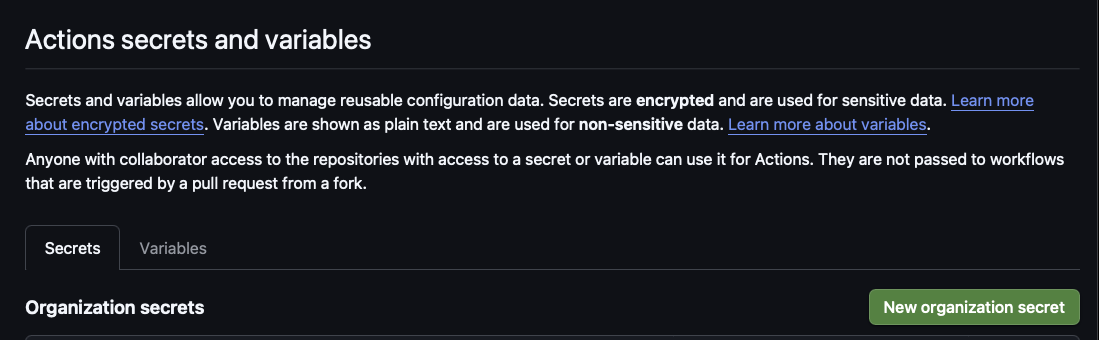
Add it at the organization level (Settings → Secrets and variables
→ Actions) so every repo that needs it can read it, and scope it to an
environment — dev and
production — so a dev key can never be applied to prod.
Secret, not variable — this one actually bites. GitHub masks secrets.* in logs as ***. It does not mask vars.*. A sensitive value stored as a variable gets echoed into the run log in cleartext, and every retained log is then a copy of your credential. Variables are for non-secret config — an account id, a region, a hostname. Anything a third party would consider a credential goes in a secret.
Step 2 — Declare it in the pipeline, don't hand-write a step
The tempting version is one aws ssm put-parameter step
per value. Ten values later it's ten copy-pasted steps that drift, half-apply when
one fails, and silently clobber whatever a human changed by hand. Declare the
parameters in a manifest instead, and let one script apply it:
// .github/ssm-parameters.json
{
  "name":        "/platform/apm_residential_proxy",
  "type":        "SecureString",
  "source_env":  "APM_RESIDENTIAL_PROXY_CONFIG",
  "description": "Proxy config JSON. Read with WithDecryption=true."
}
The workflow's only job is to map the GitHub secret onto that
source_env name. Pass it through
env: — never interpolate a secret
straight into a run: line, or bash will happily expand
any $ or backtick that happens to be inside the value:
on:
  workflow_dispatch:
    inputs:
      environment: { type: choice, options: [dev, production] }
      dry_run:     { type: boolean, default: true }   # safe by default

steps:
  - name: Apply SSM parameters
    env:
      APM_RESIDENTIAL_PROXY_CONFIG: ${{ secrets.APM_RESIDENTIAL_PROXY_CONFIG }}
run: ./bin/put-ssm-parameters --environment "$TARGET" $DRYChoose String vs SecureString by who reads it. CloudFormation cannot resolve a SecureString through AWS::SSM::Parameter::Value<String>. So a value a SAM template resolves at deploy time has to stay String; a value the SDK fetches at runtime with WithDecryption=true should be SecureString. Flipping the type on a parameter that dozens of functions resolve will break every one of their deploys at once — so the applier should refuse to change a type rather than do it silently.
Step 3 — Dry-run, then dev, then production
Never let the first run be a write. The dispatch defaults to a dry run for a reason:
- Dry-run against dev. The run reports
CREATE/UPDATE/NO CHANGE/TYPE DRIFTper parameter and writes nothing. Read it as a plan: the only line that should surprise you is the one you came to add. - Apply to dev — re-dispatch with
dry_run: false. Then actually exercise the feature that needs the key, in dev, before going near prod. - Dry-run production, read it again, apply. Prod is a different AWS account with its own value; a clean dev run tells you the mechanism works, not that the prod value is right.
What separates a pipeline you can run at 5pm on a Friday from one you can't:
| Property | Why it matters |
|---|---|
| Dry run by default | The destructive option has to be the one you type on purpose. |
| Validate every value before the first write | An unset variable at parameter 9 of 12 otherwise leaves the environment half-applied. |
| Refuse to overwrite across a type change | Stops a run from silently downgrading a SecureString back to plaintext. |
| Only write what changed | No version churn, and the parameter history stays readable. |
Values via env:, never inline | Multiline values and shell metacharacters survive intact. |
| Runnable locally | You can dry-run against dev from your laptop before you ever push the workflow. |
Write down what you deliberately don't manage. Some parameters are written at runtime by the app itself; some are managed by hand on purpose. If the manifest doesn't say so, the next person reads the gap as an oversight and "fixes" it — overwriting a live value. A short deliberately not managed here list, with the reason for each, is the cheapest incident you'll ever prevent.
Where this connects: the consuming side — {{resolve:ssm:…}} at deploy versus fetching at cold start for values that rotate — is in Part 6, and the deploy-time vs run-time split is in Part 12. This section is drawn from a real hardening pass on our own platform repo (JNET-2597), which is also where the "variables aren't masked" lesson came from.
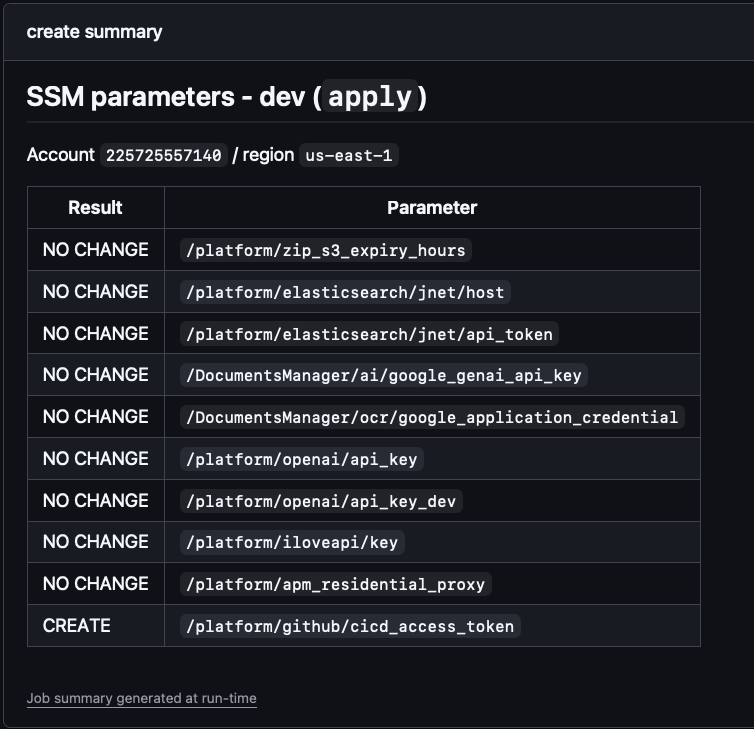
NO CHANGE rows and exactly one CREATE — the parameter you came to add, and nothing else moved.Reading the logs when a deploy fails
When a provision or deploy step goes red, work from the outside in: the CI run tells you which step failed, then the cloud tells you why. Three places, in order:
1. CloudFormation stack events — the "why" of a failed SAM / CFN deploy
A SAM / CloudFormation deploy fails as a stack event. The first event that failed carries the real reason — the rest are the rollback cascade:
# find the root-cause failures on a stack
aws cloudformation describe-stack-events --stack-name notes-api-dev \
  --query "StackEvents[?contains(ResourceStatus,'FAILED')].[LogicalResourceId,ResourceStatusReason]" \
--output tableRead bottom-up. CloudFormation lists newest-first, so the root cause is the earliest *_FAILED event — usually "access denied", "already exists", or a resource's own error. Everything above it is just the rollback unwinding.
2. CloudWatch Logs — the application's own errors
# Lambda (SAM): tail a function's logs
sam logs -n DocumentsFn --stack-name notes-api-dev --tail
aws logs tail /aws/lambda/notes-api-dev-DocumentsFn --follow --since 10m

# ECS / Fargate: tail the service's log group
aws logs tail /ecs/notes-api --follow --since 10m
3. The pipeline + Terraform output
The GitHub Actions run shows the failing job and step; the infra job's terraform plan / apply output shows resource-level errors inline. Open the failed run, expand the red step — the AWS error is usually right there before you ever touch the CLI.
Unsticking CloudFormation & a stuck pipeline
A stack's status decides what you can do next. When the pipeline seems to
"hang" on a deploy, it's almost always because the stack is in a state that
can't be updated — SAM errors "stack … is in ROLLBACK_COMPLETE state and
can not be updated". Match the state to the fix:
| Stack status | What happened | Fix |
|---|---|---|
ROLLBACK_COMPLETE | The first CREATE failed and rolled back — the stack exists but is unusable. | You can't update it. Delete the stack, fix the cause, redeploy. |
UPDATE_ROLLBACK_FAILED | An update failed, and the rollback itself failed (a resource wouldn't revert). | continue-update-rollback, skipping the stuck resource; then fix + redeploy. |
UPDATE_ROLLBACK_COMPLETE | The update failed but rolled back cleanly. | Fix the template / cause and redeploy — no cleanup needed. |
*_IN_PROGRESS (wedged) | An op is stuck (an ENI/VPC cleanup, a custom resource that never signalled). | Find the stuck resource in events; wait for the timeout, or cancel-update-stack. |
# ROLLBACK_COMPLETE → delete, then let the pipeline redeploy fresh
aws cloudformation delete-stack --stack-name notes-api-dev
aws cloudformation wait stack-delete-complete --stack-name notes-api-dev

# UPDATE_ROLLBACK_FAILED → continue the rollback, skipping what won't revert
aws cloudformation continue-update-rollback --stack-name notes-api-dev \
--resources-to-skip StuckLogicalIdTerraform "Acquiring state lock" hang. A cancelled or crashed apply can leave a lock in the state backend (the DynamoDB lock table), so the next infra run blocks forever. Release it deliberately — terraform force-unlock <LOCK_ID> (that's exactly what the terraform-unlock workflow is for). Only unlock once you're sure no apply is actually running.
ECS deploy that never finishes. A wait-for-service-stability step hangs when new tasks won't turn healthy — a bad image tag, a failing health check, or a crash on boot. Check aws ecs describe-services events and the task logs; a "stuck" deploy is almost always a crash-looping container, not slow AWS.
Don't fix a rollback by hand-editing resources in the console. That drifts the stack from its template and the next deploy fails harder. Resolve the state (delete / continue-rollback / unlock), fix the cause in the template or params, and let the pipeline redeploy. For a wedged ticket env, the fastest path is usually to tear it down (delete-stack or the remove-env workflow) and let the PR spin a clean one.
A CLAUDE.md for the platform repo
# CLAUDE.md — Platform Infrastructure

## What this is
Shared AWS platform for all services. Terraform owns long-lived/shared/stateful infra;
per-service SAM/CloudFormation stacks own compute and reference the platform via SSM.

## Ownership
- Terraform (this repo): VPC, subnets, security groups, S3, RDS, EventBridge bus,
  ECR, IAM baseline + OIDC, Route53/ACM, and the /platform/* SSM parameters.
- SAM/CFN (service repos): Lambda, API Gateway, per-service EventBridge rules,
  scoped IAM. They READ /platform/* via {{resolve:ssm:...}} — never hardcode ids.

## Rules
- Stateful or shared → Terraform. A service stack must NEVER create a bucket/DB/bus.
- Publish every shared id/ARN/name to /platform/* so services stay decoupled.
- Least privilege: OIDC deploy roles per repo (keyless — trust policy pinned to that
  repo + branch/environment; no AWS_ACCESS_KEY_ID anywhere); scoped execution roles
  per function.
- Deletion protection on stateful resources (RDS, prod buckets).

## Commands
- terraform plan (review!) → terraform apply, per stage.

## Verify
- terraform plan is clean; /platform/* params resolve; a service that reads them deploys.
Let Claude Code stand up the platform
Brief it like an engineer — name the pieces, the tool boundary, and the contract, and insist on a plan before apply:
> Stand up the base AWS platform for the dev stage in Terraform:
  a VPC (2 private + 2 public subnets, 1 NAT), a shared app security
  group, an S3 documents bucket, an EventBridge bus, an ECR repo, and
  a GitHub OIDC deploy role. Publish vpc id, subnet ids, sg id, bucket
  name, bus name, and role ARN to /platform/* SSM parameters.
  Keep IAM least-privilege and put deletion protection on the bucket.
  Do NOT create any Lambda or API Gateway — those live in the service
SAM templates and read these params. Show me `terraform plan` first.Reusable shape: name the shared pieces → Terraform owns them → publish ids to /platform/* → keep IAM least-privilege → don't create per-service compute here → verify with terraform plan.
Next up — Part 2: Platforms: Vercel, Supabase & the AWS Alternatives — the managed shortcuts to everything you just saw, and when they're the better call. Then deploy onto the platform: the Python SAM API (Part 6) or the ECS Fargate container (Part 7), wired together by events (Part 8) and shipped via CI/CD (Part 12).